PV8 Infinite possibilities for existing PV

HOW PV8 WORKS

Find the next income opportunity for your solar site.

Start with a location. Compare continued operation, plant upgrades and new uses of your power and land. Turn the strongest option into a decision you can share.

Screen my site → Explore the interactive example →

Find the opportunity. Then develop it.

01 · SCREEN

Screen for free

Enter a plant name, address, coordinates or Maps link. Start with an operating plant or a ready-to-build project.

Add PVsyst, layout, boundary or generation files if you have them. Readable figures inform the screen; estimates and missing inputs stay visible.

No account or payment card needed for the public site screen.

Screen my site →

02 · KEEP THE RESULT

Your opportunity report

Download the public report or request it by email without an account. Create a free account to save the result and carry it into your workspace.

Free with an account

Create a free account to keep your result. No payment is collected here.

03 · DEVELOP

Develop your selected opportunity

Add your plant records, confirm extracted inputs and compare scenarios. Review equipment, hourly energy matching, cash flows, financing and sensitivities alongside the evidence each option still needs.

Use the engines available in your plan to compare scenarios, edit assumptions, save results and share supported exports. You provide and review the site evidence; exports depend on the engine and available inputs.

Optional assisted site study

Commission help to develop a selected opportunity under a separate scope and price. Agree the deliverables and required external checks before commissioning; a software subscription does not include this service.

Discuss my site study →

Watch supports recorded deadlines, evidence and assigned actions. External grid, regulatory, market and equipment monitoring requires configured and validated sources. Check coverage and verification status in your workspace; a subscription alone does not activate those sources.

Start with the public opportunity screen.

Compare cautious, base and upside cases with local infrastructure and potential off-takers. Coverage varies by country and source; mapped candidates still need demand and connection checks. Assess repowering and battery storage separately in the workspace.

How is the owner's income calculated?

An external operator funds and operates the additional equipment. Split only the surplus after operating costs, equipment debt, rent, minimum operator return and the owner's spot-income baseline.

Additional income is compared with the same optimized spot-market alternative and includes site rent. Each scenario is conditional, not a quote. Failed cases keep spot income. Existing PV costs and taxes are excluded.

What you can assess in your workspace.

Use your site evidence to develop an option, compare it with continued operation and identify the next checks. Available tools depend on your plan, country and inputs.

Repowering & battery storage

Compare keeping, repairing or repowering the plant. Assess replacement equipment, hourly yield, support expiry, costs and released land; test battery sizing and dispatch with the relevant grid and price inputs.

Grid value & connection strategy

Review import and export limits, curtailment, capacity sharing and flexibility options. Keep indicative network capacity separate from the connection rights confirmed for your plant.

Direct-wire energy supply

Identify potential off-takers, compare cable routes and match solar output to demand. Test supply economics and record the land rights, metering and buyer evidence still needed.

Modular data centre co-location

Assess IT capacity, layout, solar and grid supply, cooling, fibre connectivity and economics. Use the result to scope discussions with operators and connectivity providers.

EV charging hub

Compare charger configurations using traffic, nearby competition, expected utilisation and energy costs. Check the site layout, grid supply and financial model before seeking operator terms.

Farming, greenhouses & irrigation

Compare crop and greenhouse options, agricultural access and land economics. Assess irrigation demand, pumping and solar matching with the available water and operating evidence.

Wind–PV hybridisation

Screen wind resource, turbine layout, setbacks, energy yield and project economics. Confirm land, permitting and connection requirements before treating a layout as deliverable.

Land sale & leasing

Compare sale, lease and leaseback scenarios, including land released by repowering. Review parcel evidence, access, planning and valuation assumptions separately from electricity income.

Save a decision version, export the supported report or model, and invite reviewers. Request missing evidence or counterparty terms, review replies and recalculate when inputs change. PV8 Watch keeps recorded deadlines and assigned actions attached to the decision.
INTERACTIVE EXAMPLE

Explore a sample site decision.

Try layouts, cash flows and evidence checks on a synthetic solar site. These eight teaching examples are a simplified introduction, not the full workspace engines or an assessment of your site.

ILLUSTRATIVE SITE

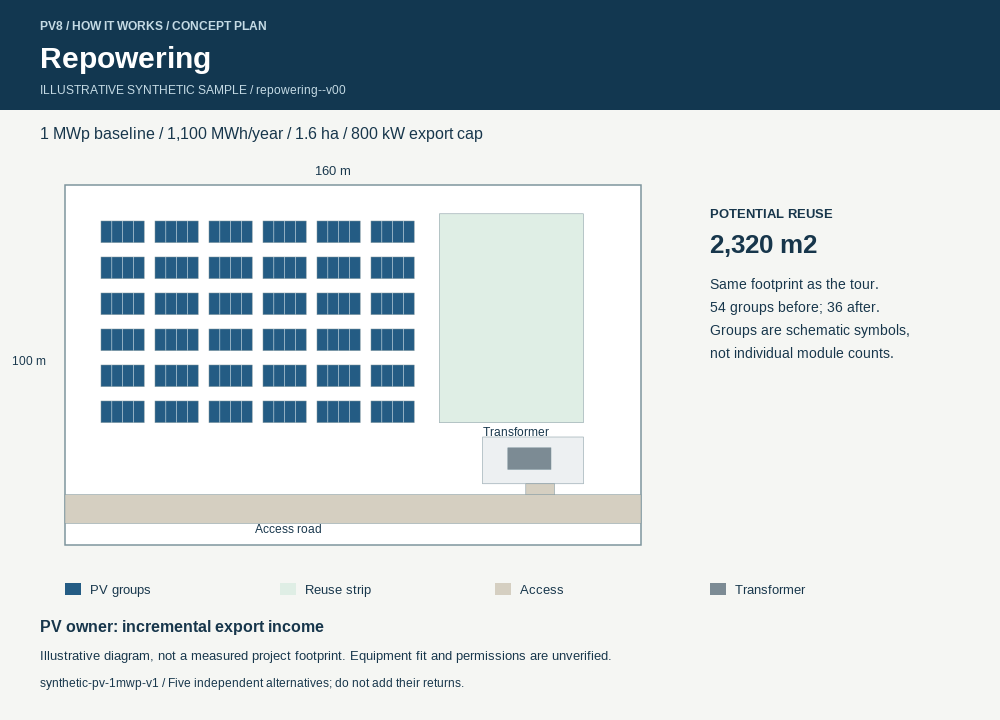
PV + repowering

1 MWp · 1.6 ha
Illustrative solar site with space released by repowering

A synthetic site, not a customer project. Objects and clearances are illustrative.

PV modulesSite boundarySpace to explore

START WITH A QUESTION

What would you like to achieve?

You already have land, electricity and infrastructure. Explore what else they could do.

No account or upload is needed for this tour.

Read the guide →

SEE WHAT FITS

Same site. A different possibility.

Choose one of eight sample options, then switch between the existing and proposed layouts.

In your workspace, use your own boundary and placed equipment. Switch to 3D to explain the concept to others.

Read the guide →

EXPLORE THE TRADE-OFF

What changes the result?

Move an assumption. The finance engine recalculates the figures and the cash flow for the values you choose; downloads follow the nearest prepared case.

Cumulative cash flow · EUR

Illustrative and pre-tax. Not a quotation or a promise of returns.

Review the assumptions

20 years, constant EUR, no tax. Each option is independent; repowering costs are not included in the co-location examples.

Download full calculation · JSON
Read the guide →

KNOW WHAT TO VERIFY

A useful number has a source.

Public evidence

Start with the local picture

Solar resource, nearby infrastructure and country rules help narrow the options.

Owner evidence

Make it your site

A boundary, layout and metered generation replace broad assumptions.

Confirmation needed

Close the decision gaps

Confirm equipment quotes, grid rights and permission to change the plant.

Declare what you have

Watch the range narrow

Each item below changes an input of the uncertainty or finance engine. The band on the cash-flow chart and the NPV range follow.

This tour uses synthetic inputs. It does not claim public-source checks for this sample site.

Read the guide →

FROM EXPLORING TO DECIDING

A result you can use.

Download this sample scenario. For your own site, start with the opportunity report, then use the workspace to assess options and share a saved decision with your team, adviser or bank.

Preview report

Sample downloads are available in English and Italian. They contain illustrative assumptions, not customer data. JSON/CSV retain stable source field names.

Try this on my site → Already have an account? Open my workspace → Read the guide →

VISUAL SITE REFERENCE

Compare the site configuration

SE Vranovci · planned project · k.o. Vranovci · parcel 1162/3 (published study).

k.o. Vranovci · parcel 1162/3
Generated illustration · overlays are schematic, not surveyed. Consumer, routes and replacement equipment are hypothetical.

Source: July 2026 environmental study, pp. 5 and 14 · This visual reference is separate from the synthetic calculation below. Selecting a route or configuration does not change its metrics or downloads.

Eight examples to explore.

Each example has a prepared layout, economics and downloads. The data-centre, greenhouse and land examples show owner lease income; they do not model the tenant business. Repowering here does not include battery dispatch.

Find the routes that matter for my site → Browse all guides →

Make it work for your business.

Asset owner

Compare options with your own site evidence, save decision versions, collaborate with reviewers and use PV8 Watch to track the recorded deadlines and actions behind a saved decision.

Start my workspace →

EPC

Identify prospective sites, review the owner's evidence and prepare a scoped proposal. Record equipment and delivery terms for review before they are used in a new assessment.

Start an EPC workspace →

Real estate advisor

Screen a property portfolio, assess occupier fit and turn the strongest opportunities into a case for your next mandate.

Explore my portfolio →

API & Developers

Embed screening widgets on your website or use scoped server access where enabled. Widget allowances are separate from full workspace assessments.

The separate API-only plan and packaged SDKs remain in release preparation. Confirm access and scope before planning an integration.

Explore website widgets
Explore the API →
Browse all guides →

A few practical questions

My modules are ageing. Where should I start?

Start by comparing continued operation, repair and repowering with your plant's condition, generation history and remaining support. Then assess storage, recycling obligations and any use of released land without counting the same benefit twice.

Can I use my existing engineering files?

Start with your location, then add boundaries, layouts, equipment information and generation records. Keep using your engineering tools; PV8 helps compare opportunities and organise the evidence for a decision.

Is a promising result ready to build or finance?

No. Screening helps prioritise the next investigation. Surveys, connection rights, permits, equipment quotations and customer demand still need confirmation.

Where does AskPV8 help?

Ask about a result, an assumption or the next missing input. Review proposed changes before applying them. The calculation engines, not the chat response, determine the financial result.

Can someone else review my result?

Share a saved result with permitted recipients. Your private asset profile and unrelated work remain separate. You control access and can revoke the link.

Later runs never rewrite that decision record.

Recipients verify their work email to contribute; nothing changes a result until the owner reviews and accepts it.

A PV8 account is required only when the recipient chooses to retain the work in a workspace, expand it into other engines or originate a new asset.

Do I need an account to begin?

Screen a site before registering and create a free account to keep your opportunity report. A detailed site study is scoped and priced separately. Current trial terms and plan limits are shown at sign-up.

See current trial terms →